Serious planning power without making it complicated
The Roaming-Oz Big Lap Budget Planner brings the financial details of your Australian road trip together in one practical desktop application.
Whether you are planning a short adventure, an extended trip or the full Big Lap, you can build a budget around your travel style, your vehicle and your priorities — from one week through to 36 months.
Explore the eight feature areas below for an overview of what the Planner can do. Each section also links to a more detailed explanation.
Getting Started & Trip Setup
-
Plan a Big Lap, Extended Trip or shorter Australian road trip lasting from one week to 36 months.
-
Enter your actual departure and return dates; travel days and nights are calculated for you.
-
Set your expected travel distance and pace, then refine them as your plans take shape.
-
Plan for solo travellers, couples and families, including children and pets.
-
Select your touring vehicle and choose whether you will tow a caravan, camper trailer or other tow rig.
-
Choose weekly or monthly financial reporting to suit your trip.
-
Change your dates, distance or travel arrangements and see the relevant budget calculations update.
Explore Getting Started & Trip Setup →
Vehicle, Towing & Remote Touring
-
Create and reuse vehicle and tow-rig profiles with your own running-cost assumptions.
-
Plan for petrol, diesel, LPG, electric vehicles and hybrid or plug-in hybrid setups.
-
Use Plug vs. Pump assumptions where battery and liquid-fuel travel are both involved.
-
Calculate fuel economy from kilometres driven and litres used, then estimate travel energy costs using your vehicle, towing and remote-area assumptions.
-
Separate highway travel from remote or off-road touring, with allowances for higher remote fuel prices.
-
Include applicable AdBlue, generator fuel, camping gas and tow-rig diesel-heater fuel costs.
-
Factor in vehicle or tow-rig registration, insurance and roadside assistance where relevant.
Explore Vehicle, Towing & Remote Touring →
Build Your Trip Budget
-
Create your own accommodation mix, from free camping where permitted and low-cost sites to caravan parks, stations and cabins.
-
Allocate accommodation nights across your chosen options so they add up to the actual nights in your trip.
-
Budget for groceries using adult and child allowances, with adjustments for remote-area food costs.
-
Include everyday expenses such as eating out, laundry, showers, medical items, internet and communications.
-
Allow for tours, attractions, sightseeing and experiences that matter to you.
-
Include pet expenses and regular household or financial commitments that continue while you are away.
-
See how each category contributes to your whole-trip cost and adjust your choices at any time.
Explore Building Your Trip Budget →
Big Costs & Maintenance
-
Add Known Big Costs such as major tours, equipment purchases or other significant planned expenses.
-
Specify when those costs are expected and include or exclude individual items from your current forecast.
-
Forecast vehicle servicing and tyre replacement using your entered distances and maintenance assumptions.
-
Allow for applicable tow-rig servicing, wheel bearings, batteries, registration and insurance.
-
Add manual maintenance events for other work you know will need attention.
-
View expected maintenance on a calendar and event list, with costs included in the budget and cashflow.
-
See potential spending spikes ahead of time instead of hiding major bills inside an average allowance.
Explore Big Costs & Maintenance →
Dashboard & Financial Readiness
-
See the main figures from your trip brought together in an easy-to-read Dashboard.
-
Compare expected trip spending with departure funds and income anticipated while travelling.
-
Set a Safety Net you would prefer to protect and a separate Contingency Reserve for unexpected costs.
-
See the projected closing position and recognise when spending may put protected funds under pressure.
-
Build a Trip Saving Plan showing your estimated funding gap and the weekly or monthly savings needed before departure.
-
Review key travel assumptions, accommodation patterns and the costs driving your forecast.
-
Use the financial indicators to inform decisions, not as a guarantee of what the trip will actually cost.
Explore Dashboard & Financial Readiness →
Planning Review & Stress Testing
-
Use Planning Review to check whether important areas of your trip have been considered.
-
Recognise deliberate zero-dollar choices without treating every $0 allowance as a planning mistake.
-
Run Evaluate My Budget to identify assumptions, spending pressures and possible savings worth reviewing.
-
Follow relevant recommendations back to the budget area that needs attention.
-
Apply adjustable Mild, Moderate or Severe stress-test scenarios to see how higher costs may affect your plan.
-
Compare your normal forecast with a stressed result and look for periods when finances may become tight.
-
Explore alternatives without replacing your original budget assumptions.
Explore Planning Review & Stress Testing →
Cashflow & PDF Reports
-
View projected finances week by week or month by month, based on your chosen reporting setting.
-
Follow opening funds, expected income, regular spending, timed major costs and the running closing balance.
-
Identify the periods of highest projected spending and see where your Safety Net may come under pressure.
-
Use charts and period-by-period figures to understand when you may need money, not just how much.
-
Generate a concise Trip Summary PDF or a more detailed Full Trip Report.
-
Create a practical Week-by-Week or Month-by-Month Trip Report for reference while travelling.
-
Save, print and share your PDFs yourself, and generate updated reports as your plans change.
Explore Cashflow & PDF Reports →
Offline Use, Licensing & Help
-
Save trip plans as local files on your computer, without needing a cloud account to store your budget.
-
Reopen and continue refining saved trips, with reusable vehicle and tow-rig profiles.
-
Use the main planning and calculation functions offline when internet coverage is unavailable.
-
Activate your desktop licence online and reconnect periodically for licence verification.
-
Purchase a one-off desktop licence rather than paying a monthly subscription.
-
Access extensive context-sensitive explanations throughout the planner and a comprehensive, searchable offline Help Centre.
-
Review licence status, software updates and support information in the application.
Explore Offline Use, Licensing & Help →
Built to help you plan with confidence
Every Australian road trip is different. The Roaming-Oz Big Lap Budget Planner helps you develop a financial plan around your travel style, your vehicle, your priorities and your budget, then review and refine it before you head off.
Not planning the full Big Lap? If you're organising a family holiday or a few weeks exploring Australia, discover how the same tools can help with your Australian road trip budget.
Heading off the beaten track? Our 4WD Touring Budget Planner page explores the additional costs and considerations involved in towing, remote-area travel and vehicle maintenance.
Want to explore the Planner? Return to the Big Lap Budget Planner home page to browse all eight detailed guides and learn more about desktop availability.
Explore example PDF reports
See the reports from our family Australian Big Lap demo trip. Select a preview to open the PDF in a new tab.
Compatible with Windows 10 and 11 (64-bit), and macOS 12 Monterey or later (Intel and Apple silicon)




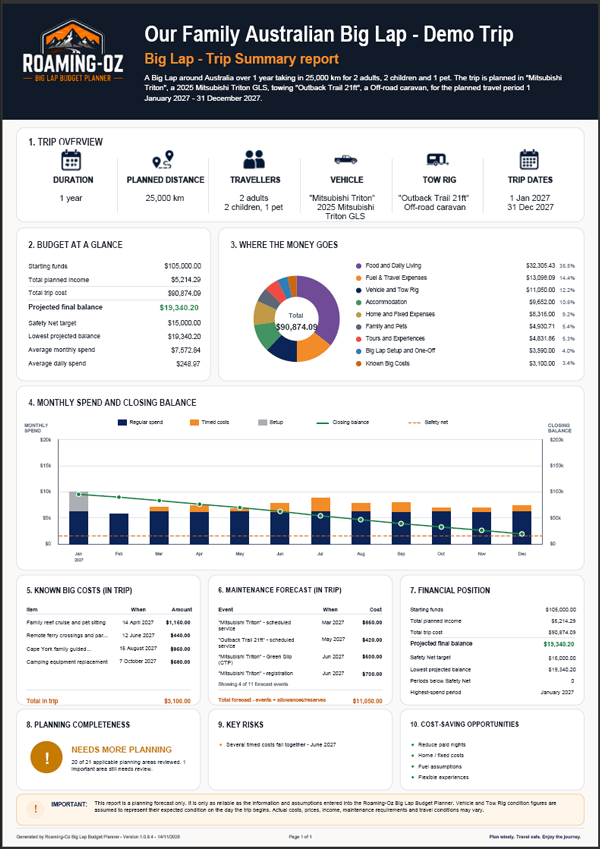 Budget summary report (PDF)
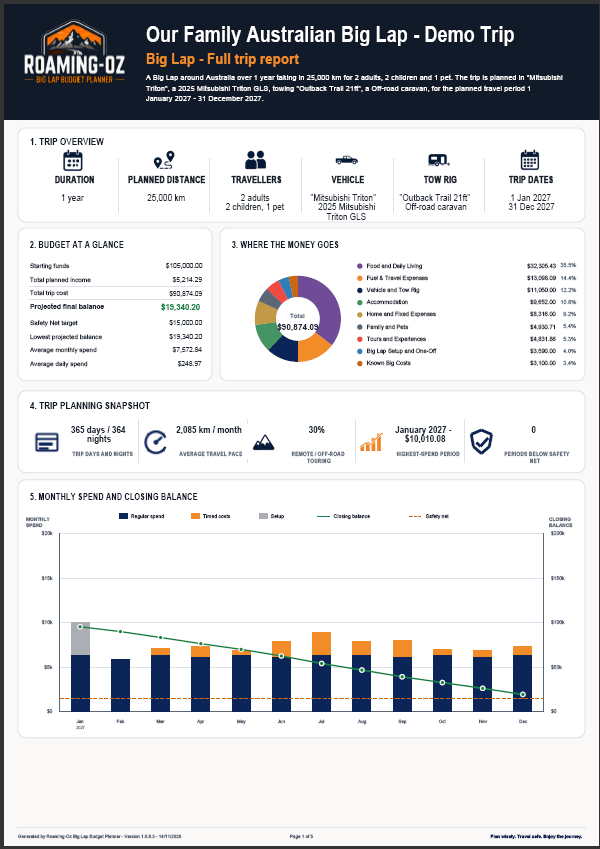 Full trip report (PDF)
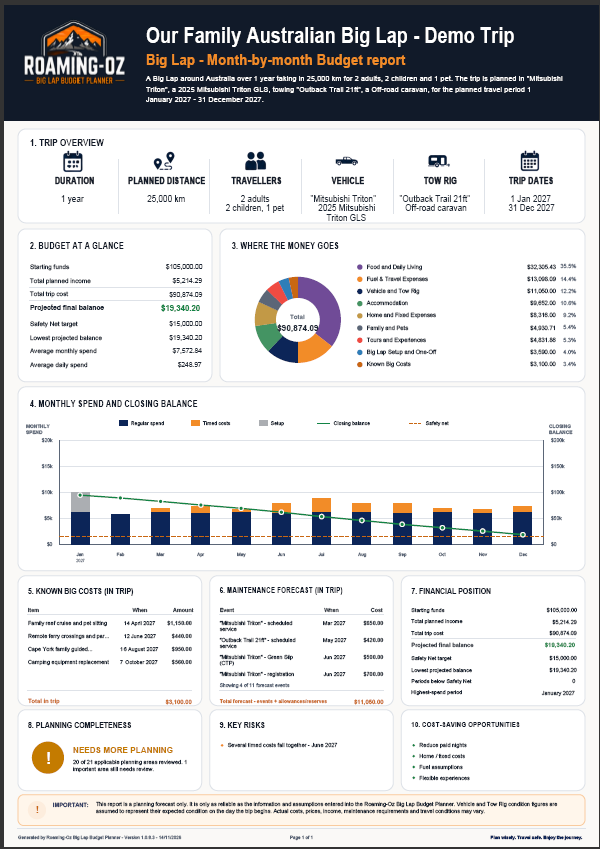 Month-by-month report (PDF)